Solutions

Cover the entire customer journey

Pick the AI pattern that fits where your customers actually need help — from public discovery to internal team co-pilots.

Acquisition

Increase conversion rates and reduce the amount of incoming support tickets.

Retention and upsells

Improve retention, supercharge sales expansion, and deflect support tickets.

Self-service support

Offer your customers 24/7 support, in websites or client portal.

Co-pilot for support teams

Reduce support ticket handling time in customer support teams.

Features

One-stop-shop for your AI solution

Everything you need to ship AI in production — from no-code components to enterprise governance, all on one compliant foundation.

Agentic AI

Combine AI assistance, semantic search, and agentic tasks for 24/7 support.

No-code management

Easy UI integration with 20+ templates, automated AI training, and clear insights.

Integrates anywhere

Unlock your existing business systems with any of our 50+ connectors.

Privacy and security

Benefit from enterprise-grade privacy protection for European sectors.

Customers

Trusted by leaders

How regulated-Europe brands — from Visma to Onguard — turned customer success into a revenue engine with Unless.

Visma Enterprise AS

Norway's leading ERP — modernized self-service with Unless.

Helping patients

After Zorgdomein deployed Unless, patient self-service surged within weeks.

Enhancing credit software

Financial service Onguard powers their support operations with Unless.

Ticket deflection at scale

Meet Sally, Kontek’s AI support colleague in a complex regulatory landscape.

Resources

Resources and support

Documentation, articles, and recipes for getting the most out of your Unless deployment — plus a help desk when you need a human.

Help center

Read how to get started of find advanced guides to help you using our platform.

Security and compliance

Privacy protection measures, security by design, and compliance guidelines.

Developer documentation

Find reference documentation for the javascript API.

The Unless cookbook

Bite-sized implementation examples for every stage of the customer lifecycle.

Pricing

Subscription plans

Transparent plans for every team size — start with a free pilot, scale to enterprise with a phased implementation plan.

High level plan overview

Our subscription plans cover your entire user journey with three use cases.

Additional services

We offer premium support, custom development and integrations.

Compare plans

Choose the right subscription plan with this feature comparison table.

Frequently asked questions

Check out the list of what others asked our sales reps.

Article

Integrate the team assistant with Freshdesk

Configure Freshdesk groups to your environments and optional topics in Unless.

Updated 26 March 2026

If you've installed and authorized the Unless team assistant extension, the next step is to integrate it with your Freshdesk set-up. This will streamline your work as the AI will automatically pick up on the ticket and it's topic (if there is one) and answer the question accordingly.

Here are the steps to follow:

  1. In the Unless dashboard, go to the Team assistant tab, click on Platforms and select Configure for the Freshdesk integration.
  2. In the “Groups” tab, press “Add group configuration”, enter the group name, choose the environment and optionally a topic.
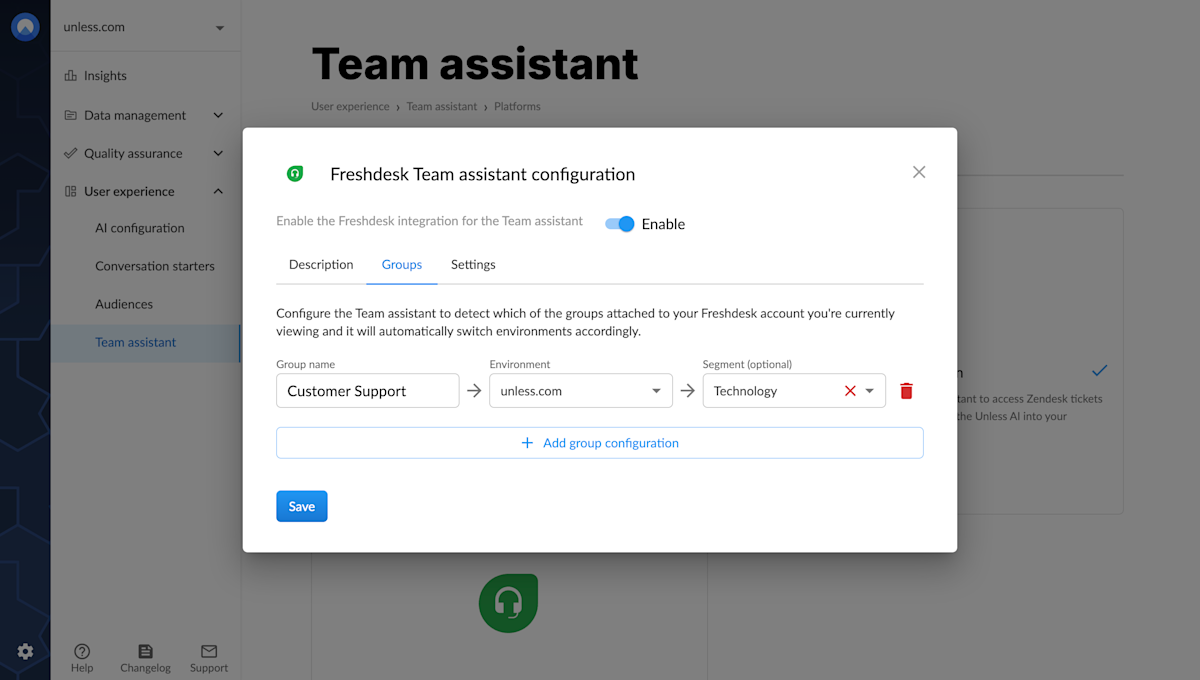
Freshdesk configuration for the team assistant

  1. Do this for all the groups you want to add.
  2. Next, you can switch on the integration by clicking Enable.
  3. If your extension was already open on the side, close it and re-open to make sure the settings are updated. Optionally, you can sync settings via the menu icon on the top right corner of the extension.
  4. Finally, you must ensure that the “Group” field is visible in the ticket fields.
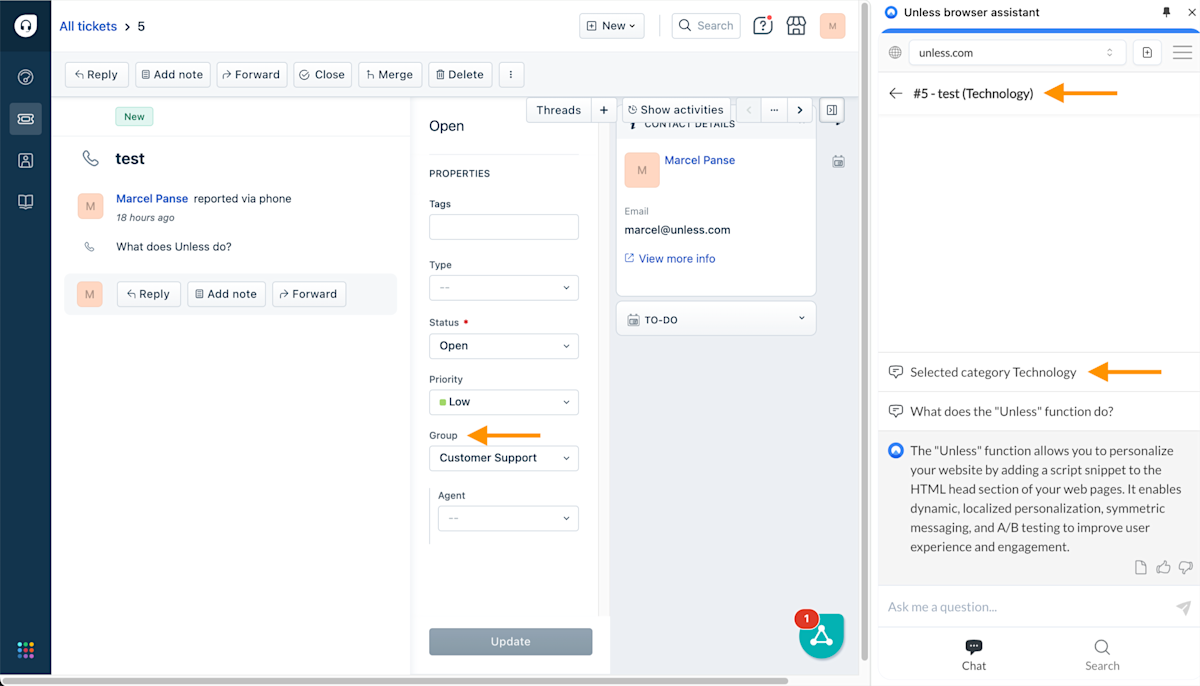
Freshdesk ticket example with the browser assistant open on the side

Now the assistant will automatically choose the right topic based on the group when you open a ticket. You can easily recognize this because the topic name will be in parentheses in the title of the conversation and shown as the selected category in the chat.


Related content

We're here to help

Quick responses if you have an issue. Feel free to ask us anything — or ask our conversational AI a question.